
This is an old revision of the document!
Table of Contents
Blog me! Shop - Shop Version
Script version: 0.1
Last update: 04/01/2022
“Blog me! Shop - Shop Version” is a tool to manage how your Shop/Brand work with your Bloggers
This is a fully operational tool that links Second Life™ with an external platform, accessible via your in-world name and a password that can be retrieved from the Virtualty Office (http://maps.secondlife.com/secondlife/Falcata/70/154/26)
Basic elements

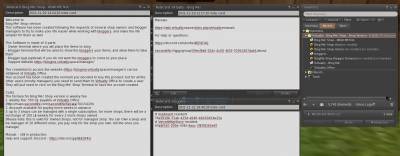 The tool is made of three elements:
Blog Me! Shop Owner- The interface to manage the shops/brands that you ownBlogMe Shop Blogger Terminal- The terminal to be accessed by the bloggers in order to take the items that are made available by the Shop/BrandBlog Me! Shop Hud- The (optional) Hud that can be given to the Bloggers in order to receive directly your items
Plus of course the Management website, that can be reached at
https://blogme.virtualty.space/manager/usersc/login.php
The access credentials can be obtained at Virtualty Office
(http://maps.secondlife.com/secondlife/Falcata/70/154/26)
First Use
If this is the very first time that you are using this tool, I can imagine it will be a little confusing, at the beginning.
Just rez the Blog Me! Shop Owner. A new window will open automatically, in this window you can either select a shop/brand you already own, or you can create a new one.
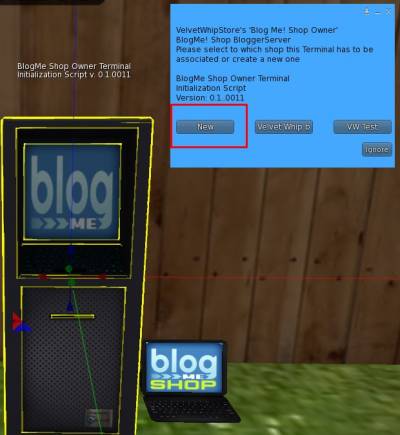
 Please be VERY careful, the name cannot be changed after!
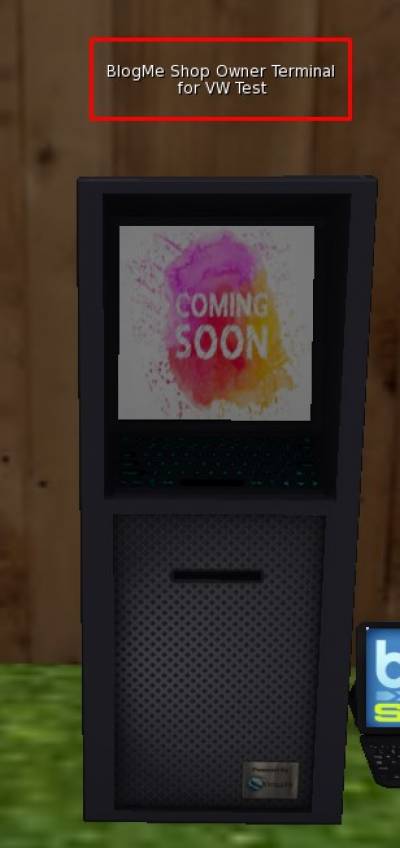
Once this is done, you will see that the name of your shop/brand will be present on the top of the Terminal
 Once you have created your own very first shop/brand, you can go into the Web App by logging in in
https://blogme.virtualty.space/manager/usersc/login.php
using your credentials
Once you have created your own very first shop/brand, you can go into the Web App by logging in in
https://blogme.virtualty.space/manager/usersc/login.php
using your credentials
Get the credentials
You should have received your credentials when you first got the product, but, if you have not or if you have forgotten your credentials, just go to the Virtualty Office (http://maps.secondlife.com/secondlife/Falcata/70/154/26) and search the Blog Me! Shop Password Recovery Terminal. Click on it and you will receive a message with your username and password
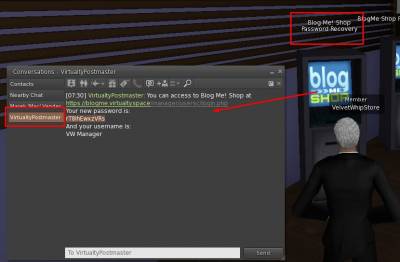 This Terminal can be used every time you need and a new password will be generated every time
Access to the Management Website
Once you have created your shop/brand, and you have your credentials, you can go to https://blogme.virtualty.space/manager/usersc/login.php and you can log in and access your pages
Note that at the beginning your logo will of course not be present, but a Coming Soon image will be displayed

Add items to be blogged
It is very easy to add items to be blogged.
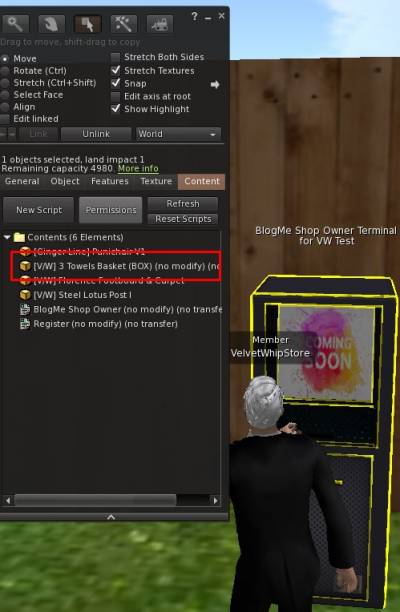
You just need to ctrl-drag the items in the Owner Terminal (or just drag them to the Content tab of the Owner Terminal)
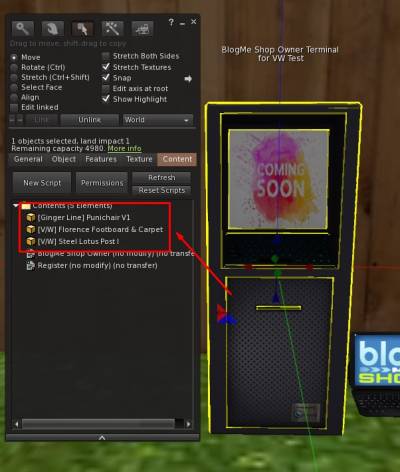 There will be a quick message over the Terminal that says that the items are being managed.
Once finished, you can go to the Web App, and in the section Items»All you will see them:
 To add new items, you actually just have to do exactly the same:

Bugs List and Modification/Suggestions
Shop Version - 0.1i20
Bugs
1 x The Blogger terminal sometime does not show the last items == temporary solution: rez a new one, trying to reproduce it == FIXED 0.1i12
2 x The Owner Terminal does not update the objects on the website == temporary solution: reset, trying to reproduce it == FIXED 0.1i13
3 x The Blogger terminal does not give the items showing a Error 8 == temporary solution: rez a new one, trying to reproduce it == FIXED 0.1i13
4 x The Hud gives the wrong text when clicking on the discord button (Flicker instead of Discord) == FIXED 0.1i10
5 x The import of the bloggers via list is not working == FIXED 0.1i10
6 x Owner terminal does not recognize the owner or wrong Owner/shop == Trying to reproduce == FIXED 0.1i17
7 x If a change has been done in the Shop from list to group, this is not seen by the Blogger terminal == FIXED 0.1i12
8 x Typo : authorized blogger, please *chech* with == FIXED 0.1i14
9 x Error in the template to insert the bloggers via notecard: the # is missing in front of the legacy name == FIXED 0.1i13
10 x The Blogger Terminal gives errors if there are not items ready to blog == FIXED 0.1i16
11 x If there are 2 items with the same name from different users and different shops, they get mixed == FIXED 20220116
12 x Hud cannot select a specific shop to show == FIXED 0.1i15
13 x A request of an item does not state the item name == web FIXED 20220108
14 x Hud does not update when put on == FIXED 0.1i16
15 x The Blogger terminal spams too much when there are no items available to blog == FIXED 0.1i16
16 x Clicking on alerts from the Top bar does not open the alerts page == FIXED 20220111
17 x Default image for the newly created shops is not visible == FIXED 20220111
18 x The programming genius forgot to put a button to edit existing items == FIXED 20220116
19 x Rules limitating the items that a blogger may take not work correctly == FIXED 20220112
20 x If IMs are too long, they are not been delivered == FIXED 20220113
21 x Too many Http messages error == FIXED 0.1i19
22 x Archived items still visible in the new list == FIXED 20220212
23 X Message notification not working in some pages == FIXED 20220223
24 x Doubled the Rules menu item == FIXED 20220222
25 x There was still a bug in the initialization of the Owner terminal, that got deleted automatically == FIXED 20220322
26 - The blogger terminal needs to be reconnected if the owner terminal is changed
27 - The Hud goes in error if there are no items in the Owner Terminal
Modifications
1 - After the initialization of the Owner Terminal, clicking on it a message is sent with the version of the product == 0.1i11
2 - When the owner click on the Blogger Terminal after it is initialized, the script is reset (to fix Bug #1 and #7) == 0.1i12
3 - In the portal added a page to view all the items regardless if active or not (Brand→Shop→All Items/Active Items)
4 - Added a check on the Blogger Terminal for uuid of the pics to avoid an error when having no items to blog == 0.1i3
5 - The Version is now present in the Description of the package (the tablet :P)
6 - Added the code to the shop to activate the hud (that previously was bloggercentered, not shop centered)
7 - Modified the Owner menu (left column) to differenciate the Items from the Shop itself
8 - Added a list of problematic itens, i.e. items that are in a Terminal that is unreachable (Bug #4)
9 - Added an automatic procedure to disabe items that are in unreachabe Terminals (Bug #4)
10 - Added more controls in the Owner Terminal to try to identify the reason for Bug #6 (still not reproduced) - left just in case I have to reopen it
Suggestions
1 x Add also the family name in the tables listing the managers/bloggers == web - 20220107
2 x Add a rule to allow only one item of the same time taken by a blogger (for the shops offering transfer items) == web - 20220109
3 x Add the possibility to send an IM also to a single person and not only at a group == web
4 x IM sent when a new blog is created == web - 20220108
5 x IM and internal message sent when a new comment is inserted == web - 20220108
6 x Archive for old items. They will not show in the “normal” operations but will be accessible == web - 20220116
7 - Settings page for - IMs/internal messages (new blogs/comments) - Store application for bloggers
8 x Owner menu for Web address, reset, debug (local/IMs)
9 x Specify the version in the title (temporarely doable, when final, it will go back in the description or it will mess up the delivery/redelivery)
10 - Store application for bloggers
11 x Add the possibility to archive a newly added object (for errors) == web - 20220212
12 - Record of IMs
13 - Add a deadline system for the single items